
MEPCO Online Bill October 2026 — Check, Download & What Changed
Introduction
October is the month when many MEPCO consumers in South Punjab open their bill with a small sense of relief — the worst of the summer heat is over, fans and air conditioners run less, and units usually start coming down. But that relief only helps if you check the bill on time, read it correctly, and catch any mistake before the due date passes.
This guide shows you exactly how to check, download and pay your MEPCO bill for October 2026 online, what changed compared with the summer months, and what to do if the bill looks wrong or simply isn’t showing yet.
Direct answer
Your MEPCO bill for October 2026 can be checked online with just your 14-digit reference number — no login or account needed. Enter the reference number on the bill checker at mepcobillinfo.online, on MEPCO’s official CCMS portal, or through the MEPCO Smart App, and your current bill appears with the amount due, the due date and a download option. If the October bill is not showing yet, it has most likely not been issued for your feeder or billing cycle — check again after a day or two, and confirm the reference number from an older bill.
How to check your MEPCO bill for October 2026
You only need one thing: the 14-digit reference number printed at the top of any old MEPCO bill. It never changes for your connection, so keep a photo of it on your phone.
- Open the bill checker — go to the MEPCO bill checker on the homepage and enter your 14-digit reference number.
- Verify the details — check that the name, address and meter number match your connection.
- Read the due date first — paying even one day late adds a surcharge, and late payment can also affect your protected-consumer status.
- Download a copy — save the bill as a PDF or take a screenshot; you will need it if a payment shows as unpaid later or if you dispute the bill.
- Pay through your usual channel — bank app, JazzCash, Easypaisa or an ATM — and keep the transaction ID until the payment reflects on the next bill.
If you have lost your reference number, our guide on checking a MEPCO bill without a reference number covers the alternatives, including the consumer ID
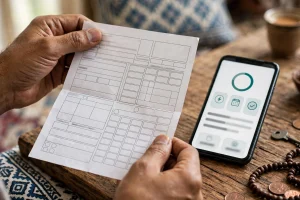 on the bill and SMS options.
What changed in the October 2026 bill
October bills are different from July and August bills in a few practical ways:
| What changed | What it means for you |
|---|---|
| Units usually fall | Cooler weather means fewer fan and AC hours, so consumption — and the bill — normally drops after the summer peak. |
| Protected status is re-checked | Protected status depends on your units over the previous six months. A high-consumption summer can still push you over the 200-unit line; see our protected vs unprotected guide for the full rule. |
| FPA still applies | The fuel price adjustment line still appears on the bill and varies month to month. Our FPA explainer shows how to read that line and work out what it added. |
| Due dates shift with the cycle | Each billing cycle has its own due date — never assume it is the same day as last month’s. Read the date on this bill. |
One important note: the October bill generally reflects the consumption of the
 preceding billing period, not the whole of October itself. If your usage dropped sharply in mid-October, that saving will mostly show up on the November bill, not this one.
How to download your MEPCO duplicate bill
Sometimes the online checker shows the bill but the download button misbehaves, or you need a clean copy for a record. The simplest route:
- Check the bill with your reference number as above.
- Use your browser’s print option and choose “Save as PDF” — this gives you a proper duplicate bill you can print or forward.
- For a full step-by-step, see our duplicate bill guide.
Keep at least the last six months of bills saved. They are your evidence if a reading is ever disputed, and they are also how you track whether your protected status is at risk.
Before you pay: a 2-minute sanity check
October is a good month to catch errors, because the bill should be lower than the summer bills. Run through this before paying:
- Compare units with last month. A big jump when your usage actually fell is a red flag — it may be an estimated reading or a meter-reading error.
- Look for “EST” on the bill. An estimated reading means the reader did not take an actual reading; the adjustment lands on a later bill, so keep the copy.
- Check the slab. If your units crossed 200, your per-unit rate changes — use the MEPCO bill calculator to estimate what the bill should be.
- Check FPA and taxes separately. These lines change month to month and are not part of your unit cost; don’t mistake a higher FPA for higher consumption.
If something is genuinely wrong, don’t just pay and hope. Read our guide on why your MEPCO bill may be high first, then raise it through CCMS — our complaint registration guide walks through the process, and you can track the complaint online afterwards.
What to do if your October bill is not showing
This is the most common October query, and it usually has a simple explanation:
- It may not be issued yet. Bills are issued in batches by feeder and billing cycle, so your neighbour’s bill can appear days before yours.
- The reference number may be mistyped. One wrong digit gives a blank result. Copy it from an old bill, not from memory.
- The checker may be temporarily down. MEPCO’s own systems occasionally go offline during billing runs; try again later rather than assuming the bill doesn’t exist.
- A very old or disconnected connection may not show online at all — in that case, visit your nearest MEPCO office with your CNIC and an old bill.
Never pay a bill you cannot see. Wait for the official figure, and if the due date is approaching while the bill still isn’t showing, contact the MEPCO helpline 118 or visit your subdivision office before the date passes.
FAQ
When will my MEPCO bill for October 2026 be available online?
MEPCO issues bills in batches through the month by feeder and billing cycle, so availability varies. If your bill is not showing yet, it most likely has not been issued for your cycle — check again after a day or two and confirm your reference number from an old bill.
What do I need to check my MEPCO bill online?
Only your 14-digit reference number, printed at the top of any previous MEPCO bill. No account, login or CNIC is needed for the online checker.
Why is my October bill still high even though the weather cooled down?
The October bill generally covers the preceding billing period, so mid-October savings appear mainly on the November bill. Also check whether your units crossed 200 (which changes your slab rate) and what the FPA line added this month.
How can I download my MEPCO bill as a PDF?
After checking the bill online, use your browser’s print option and choose “Save as PDF”. This gives you a clean duplicate bill you can print, save or forward.
What happens if I pay my MEPCO bill after the due date?
A late-payment surcharge is added, and repeated late payments can affect your standing. If the due date is near and your bill still isn’t showing online, contact helpline 118 or your subdivision office before the date passes.
Can I check my MEPCO bill without a reference number?
Yes, there are alternatives — including the consumer ID printed on the bill and SMS services. Our guide to checking without a reference number explains each option and its limits.
خلاصہ
اکتوبر 2026 کا میپکو بل صرف 14 ہندسوں والے ریفرنس نمبر سے آن لائن چیک کیا جا سکتا ہے — کسی اکاؤنٹ یا لاگ ان کی ضرورت نہیں۔ بل چیک کریں، مقررہ تاریخ نوٹ کریں، اور PDF کاپی محفوظ کر لیں۔ اگر بل ابھی نظر نہیں آ رہا تو غالباً آپ کے فیڈر کے لیے جاری نہیں ہوا — ایک دو دن بعد دوبارہ چیک کریں۔ یونٹس کا ستمبر سے موازنہ کریں، اور اگر بل غیر معمولی طور پر زیادہ لگے تو پہلے اس کی وجہ معلوم کریں، پھر CCMS پر شکایت درج کریں۔ بروقت ادائیگی سے سرچارج سے بچا جا سکتا ہے۔